Saturday, 9 August 2014

How To Undo Send Messages In Your Gmail Account

Sometimes there are so many situations in which we have to undo sent messages in our inbox back. Now You will See The Process Of How To Undo Send Messages, Follow The Instruction Step By Step.

1. First of all open your Gmail account and there click on the green marked on the Right corner.


2. After clicking on the marked button, you will find a window and click on the setting button.

HTC One E8 Review


The HTC One (M8) is one of the most beautiful flagships of this generation. Perhaps not as feature-rich and inventive as most competitors, the One is still the one to beat for looks. The all-aluminum unibody is a pleasure to behold and has a matching feel in hand. The HTC One (E8) tunes in and offers and alternative reality version of what the second iteration of the One could have been.


How To Root LG G2


The LG G2 Has true HD-IPS + LCD capacitive touchscreen, 16M colors, 1080 x 1920 pixels, 5.2 inches (~424 ppi pixel density), This Phone is Available In 16/32 GB, 2 GB RAM, Camera is 13 MP, 4160 x 3120 pixels, autofocus, optical image stabilization, LED flash, This Phone is running on Android OS, v4.2.2 (Jelly Bean), But upgradable to v4.4.2 (KitKat). In This This Phone has Qualcomm MSM8974 Snapdragon 800, Quad-core 2.26 GHz Krait 400, Adreno 330. battery is Non-removable Li-Po 3000 mAh battery , this battery is enough for high use of mobile, You Can Use this in day and night continuously.


Best Gaming Smartphones

Today's Smartphone has best hardware available which is enough to play HD And 3D Game on the Smartphone, Like PC's Processor, Smartphone's Has Processor's Like Dual core, Quad core which Make Easier And Smoothly Playing Games. In Today Smartphone's We can play Big and High Graphical Games, but we get Difficulty During Playing, For That Moga Is Available In the Market, Using Moga We Can Play Games Easily, We Need To Attach Our Phone with Moga And We Can Play game with It. Moga Is Makes Easier To Play Games On Smartphone's. Click Here For Moga

Now We Will See The Best Gaming Phone's.

1) Sony Xperia Z1s 


Thursday, 7 August 2014

How To Root htc One M8


Know Before Root:

1This only works for PCs.

2. This will erase all the information on your device, so be sure to save anything you want to keep to your Computer before continuing.

3. Make sure your battery is over 75% charged.

4. This process may void all or parts of your warranty according to htc.

5. Go to setting,Battery manager, turn off Fastboot.

Wednesday, 6 August 2014

Android L Support/non support Devices

Several devices from popular brands are eligible to the Android L version soon to be released this year. Know which among models from htc, LG, Motorola, Samsung and SONY are qualified to receive Android L.

Android L will be run on htc One?

According to the official website of htc. Android L update is confirmed to the htc one Series and will be released after Google delivers the final version.

Samsung devices


Tuesday, 5 August 2014

How To Jailbreak iPhone 5S


Know About Jailbreak.

Most Of People's Are don't know about jailbreak even they will do the jailbreak in their device, basically  jailbreaking is the process of releasing your device from the so-called-walls of Apple. It is quite interesting to note that Apple has imposed many restrictions on its devices. This makes the device extremely secure and stable. However, these restrictions have not pleased techno geeks. This is because you cannot experiment or enjoy the Apple device to its fullest! Conversely, Jailbreaking destroys the closed mantra of Apple. It allows users to download third party apps, configure the iOS and modify its settings.


Monday, 4 August 2014

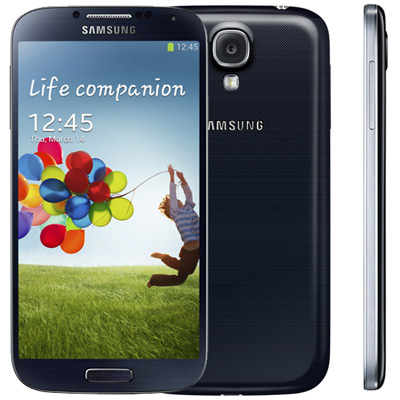
How To Upgrade Samsung Galaxy S4 To kitkat 4.4.2


Here is a tutorial on how to upgrade the Galaxy S4 to the Android 4.4.2 KitKat using Odin.But before trying their hands on the installation process, users should be aware of certain aspects.

-Backup all the data (because after installation your phone's all internal data will be deleted)

-Your Device should be charged at list 70%.

-Install the USB Drivers of your Device in to your Windows PC.

-USB Debugging should be on.


Saturday, 2 August 2014

How To Root Sony Xperia C


The Sony Xperia C Very Is Easy To Root , We Will See the Step By Step rooting process now Follow the Instruction.
1. Download The App For Root HERE

2.  Enable To USB Debugging in your Device.

3.  Open The App Which You Have Downloaded For Root Your Phone.

4. Connect your Sony Xperia C to the computer using Data Cable.

5. Once Open The App Click On The "Root Now".

Done..

Samsung galaxy Tab Q


Samsung on Friday unveiled the latest addition to its phablet lineup. While the device officially falls under Samsung’s “Tab” product family of tablets, you’ll notice that the Samsung Galaxy Tab Q is not like normal tablets. Instead, it includes an ear speaker and a microphone, and it supports voice calling. In other words, Samsung expects you to hold this gigantic beast of a tablet up to your face to make phone calls.


Sony Xperia Z3

Sony Has Announced The Sony Xperia Neo V, After Xperia Z2's Success, now Sony Presents Xperia Z3 With Great Latest Features. Sony Xperia Z3 will have a comparable curve design to Microsoft's Nokia Lumia 925.